The Customer Profile accesses all modules to present the selected customer’s details, including top-level and drilled-down information of Transactions, Aged Analysis, Orders Due, Active Sales Orders, Sales By Title, Statements, Consignments, Letters Sent, EDI History.
To view customer profile do the following
- Go to Accounts > Sales Ledger > Profile
- Search for customer in the Account box
- The Transactions tab displays the selected customer’s outstanding transactions by default
Focus displays the Customer’s basic data and balance: SL Bal B/F, SL Bal, PL Bal B/F, PL Bal, Company Name, SAN Number, Address and Sponsor.
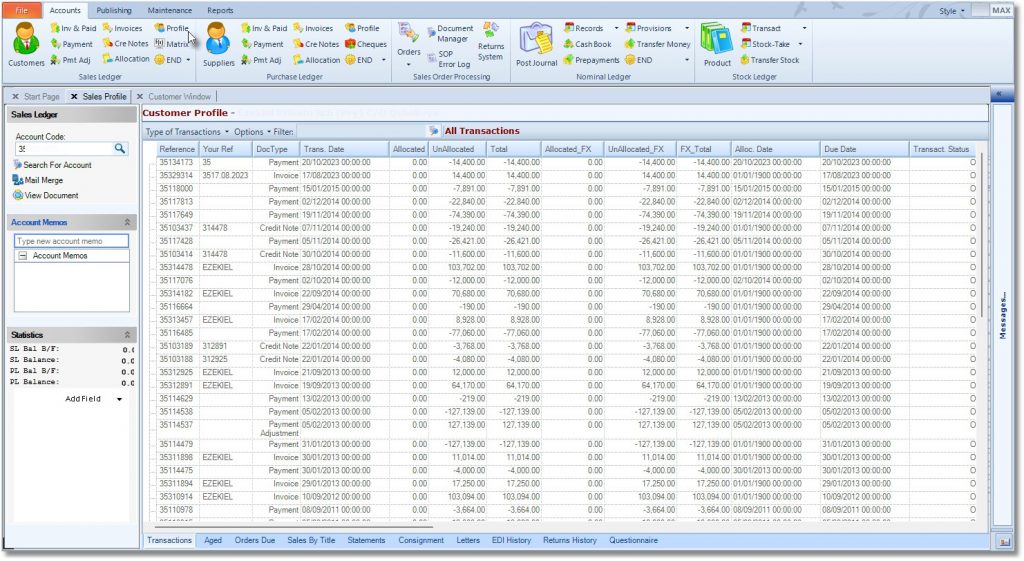
The Details section has the following tabs.
- Transactions tab: Click to view the selected customer’s transactions
- Aged tab: Click to view the selected customer’s aged analysis
- Orders Due tab: Click to view the selected customer’s orders due
- Sales Orders tab: Click to view the selected customer’s active sales orders
- Sales by Title tab: Click to view the selected customer’s sales by title
- Statements tab: Click to view the selected customer’s statements
- Consignments tab: Click to view the selected customer’s consignments
- Letters tab: Click to view the selected customer’s letters sent out
- EDI History tab: Click to view the selected customer’s EDI history
- Returns History
- Questionnaire